

Statutory Pay Advanced Funding

Where employers have insufficient Tax, NIC & Student Loan deductions to fund the payment of Statutory Parental Pay to their employee(s) then they can apply to HMRC to receive ‘Statutory Pay Advanced Funding’ to cover these payments. See Get financial help with statutory pay: If you cannot afford to make payments – GOV.UK for further details of how to apply for such funding. It is possible to record Statutory Pay Advanced Funding amounts received from HMRC and also the amounts allocated each tax period within Payroll Manager. This guide gives further details of how this operates.
How to keep a record of funding received and allocated in Payroll Manager
1) Record the received amount:
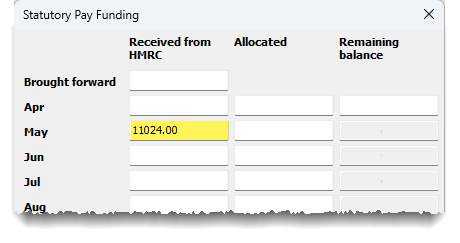
To record the receipt of Statutory Pay Advanced Funding from HMRC in Payroll Manager, click ‘Employer‘ from the main menu in the software, then ‘Statutory Pay Funding‘. Enter the total amount received from HMRC in the relevant tax period. In the example below, the employer received a total of £11024 advanced funding in May, to cover the Parenting Pay of an employee over the next 9 months.
2) Determine the amount of funding to allocate to a particular tax period, and enter the figure into Payroll Manager
At the end of each tax month/quarter, after entering the pay for all employees, click ‘Pay’ then ‘Employers Summary for tax period‘. This report will show how much is due to HMRC. If the ‘Total Tax & NIC due‘ amount on this report is a negative figure, then this indicates that there insufficient Tax, NIC & Student Loan deductions to fund the payment of Statutory Parental Pay in that period.
Make a note of this (negative) figure, then click ‘Employer‘ then ‘Statutory Pay Funding‘ from the main menu in Payroll Manager, and enter this amount as a positive figure in the ‘Allocated‘ column for that particular period. Payroll Manager will automatically keep a running record of the ‘Remaining balance‘ of the funding. In the example below, the employer has allocated £1807.54 in the tax month of May, reducing the ‘balance’ to £9216.46.
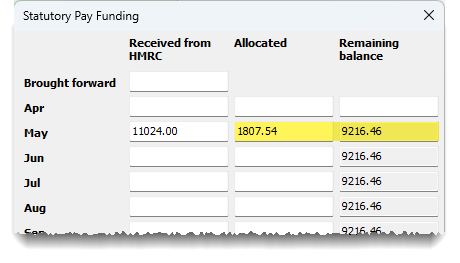
The effect of entering ‘Allocated‘ amounts in this way is to make the ‘Total Tax & NIC due’ to HMRC zero for that particular period. This will then be reflected on the ‘Pay – Employers Summary for Tax period‘ report if you re-produce it.
3) Continue to allocate funding amounts until the advanced funding has been exhausted
You should continue to allocate funding amounts in this way on a period by period basis until the entire balance has been exhausted. If any funding remains after statutory parenting payments to employees has ended, then the remaining amount should be allocated in the next available period.
Links
Get financial help with statutory pay: If you cannot afford to make payments – GOV.UK
Apply for an advance of statutory maternity, paternity, adoption or shared parental pay – GOV.UK