

Outstanding CIS 300 submissions

Normally HMRC respond to submissions almost immediately. However, sometimes HMRC have technical issues and the responses are delayed, and sometimes they lose the submission altogether and will never respond to it.
If you have submitted returns and have not received a timely response then we would recommend you wait and try to check for a response again later.
If you have still not had a response after 24 hours then it is likely that HMRC have lost your submission and will never respond to it, but you should contact HMRC Online Services on 0300 200 3600 in the first instance to ask them how to proceed. If HMRC prove to be unhelpful in this matter then you may choose to resubmit the return by following the steps below.
We would recommend waiting at least 24 hours before resubmitting.
To remove an outstanding CIS 300 submission and send it again:
- From the main menu in Payroll Manager click ‘Tools’ then ‘Online Filing’ then ‘Submission Log’.
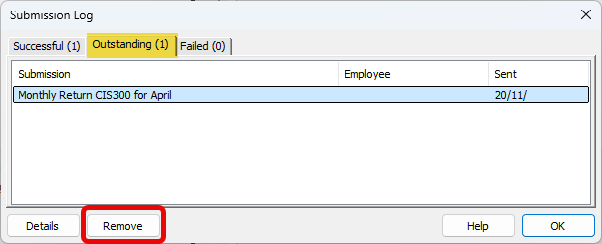
- Click on the ‘Outstanding’ tab along the top of the window.
- Single click on the outstanding submission to highlight it, and then click the ‘Remove’ button at the bottom of the window.
- Answer ‘Yes’ to the question “Are you sure you want to remove this outstanding submission”, then click ‘OK’.
- Click ‘CIS’ then ‘Monthly return CIS 300’ from the main menu in Payroll Manager and resubmit the relevant CIS 300 return.