

National Insurance Contributions relief for employers who hire armed forces veterans

In the spring budget of 2020, the Chancellor announced the introduction of a National Insurance holiday for employers that hire former members of the UK regular armed forces. The holiday will exempt employers from any National Insurance contributions liability on a veteran’s salary up to the Upper Secondary Threshold (£50,270 per year) in their first year of civilian employment (the employee will still be liable for National Insurance contributions).
Employers can claim this relief for 12 months starting from the first day of the veterans first civilian employment after leaving Her Majesty’s armed forces. Subsequent employers will be able to claim this relief during this 12 month period.
The secondary (employers) NIC relief will automatically be calculated by Payroll Manager and is claimed directly via payroll.
More information can be found at gov.uk/government/publications/national-insurance-contributions-relief-for-employers-who-hire-veterans
How will Payroll Manager handle the NIC holiday for veterans?
If you have taken on a qualifying veteran (as per the rules specified in gov.uk/government/publications/national-insurance-contributions-relief-for-employers-who-hire-veterans ) then click ‘Employees‘ then ‘Employee Details‘ from the main menu in Payroll Manager, and select the ‘Work‘ tab.

Enter the first day of the veteran’s first civilian employment in the box provided. If this is the veteran’s first job since leaving the armed forces then this date will be the same as their start date of employment with this employer. If the veteran has been employed elsewhere since leaving the armed forces, then you would need to establish their first day of civilian employment with their first employer, and enter that date.
Payroll Manager will automatically calculate the correct amount of employer NIC due (if any) for veterans in employment, once you have set the NI category to ‘V’ for that employee (see below):
How to set the NI category to V (for veterans)
Go to the ‘Pay Details’ screen and Triple-click on the NI letter in the first pay period of the year. A box will appear (as below). Tick the box marked ‘Veteran‘, then tick the box marked ‘Apply this NI letter to the remainder of the year‘, and click ‘OK‘.
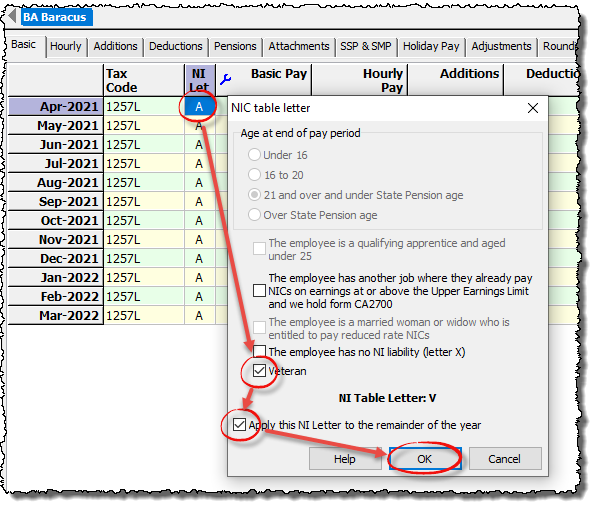
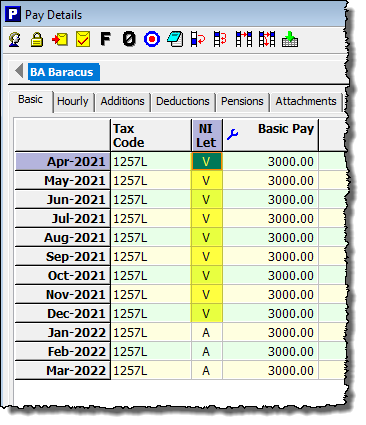
Payroll Manager will assign the NI category of ‘V’ to all applicable pay periods (i.e. all pay periods within 12 months of the veteran’s first date of civilian employment) and will recalculate the employer NIC due for each of these periods.
FAQs
What about employees that were are NIC categories B, C or J? – These employees benefit from paying a reduced rate of employee NIC, and as such NI category ‘V’ should not be used for them (Payroll Manager will automatically prevent letter V from being allocated for such employees). If you do employee a qualifying Veteran from one of these groups then you should write to HMRC in order to claim any NIC relief due.
Links
National Insurance contributions relief for employers who hire veterans – GOV.UK (www.gov.uk)
Claim National Insurance contributions relief for veterans as an employer